MCP Apps: How a Chessboard in the Chat Foreshadows the Future
I just shipped my first MCP App. An interactive widget that lives directly in the chat — no link, no tab switch, no “go open this URL.” You interact with a graphical interface right in the middle of your conversation with an AI model. And the model sees what you do.
Sounds like a gimmick? It’s not. It’s a glimpse of the future.
What Are MCP Apps — and Why Is This a Giant Leap?
Many people have heard of MCP by now — the Model Context Protocol. It’s the open standard that lets AI models communicate with external services: reading files, calling APIs, querying databases. If MCP isn’t on your radar yet, you’re missing something significant. But even if you know MCP, you may have missed the next level.
Because “regular” MCP is invisible. It happens in the background. The model calls a tool, gets data back, processes it, gives you text. You don’t notice anything — except that the response suddenly draws on your real data.
MCP Apps take a massive step further: they deliver a graphical user interface directly into the chat.
Not as a link. Not as an image. As an interactive widget living in a sandboxed iframe that you can work with — click, drag, tap. The app communicates bidirectionally with the AI model: you do something in the app, the model sees it. The model calls a tool, the app reacts.
This sounds like a small technical detail. It isn’t. It’s the moment the chat interface stops being just a text window — and starts becoming a universal tool.
The Connector Moment: One URL, Then Never Again
Today, we visit a separate URL for every service. Trello for project management, Google Calendar for appointments, Lichess for chess, Notion for notes. Each app has its own interface, its own conventions, its own learning curve.
MCP Apps change this fundamentally. You enter a URL once — as a connector. After that, the service lives in your chat. You no longer ask “Where was that board again?” — you simply say: “Show me the position with queen versus rook” — and an interactive board appears. With all pieces. Playable.
Anthropic leads by example with their built-in integrations: Google Calendar, Gmail, Slack — all directly in the chat, via MCP Apps. No tab switching, no context loss.
And now anyone can build this.
Who Supports MCP Apps?
MCP Apps were released on January 26, 2026, as an official extension to the MCP standard. Anthropic and OpenAI developed the standard together — a remarkable moment of collaboration between competitors.
Current support includes:
- Claude.ai (Web, Desktop, Mobile)
- ChatGPT (OpenAI announced support simultaneously)
- VS Code with GitHub Copilot (Insiders)
- Goose, Postman, and others
The ecosystem is growing rapidly. If you build an MCP App today, you’re not building for just one platform.
My First MCP App: A Chessboard
I’ve been working on Schachmentor, a chess opening trainer with voice coaching. When MCP Apps were announced, it was clear: the interactive board needs to live in the chat.
The idea: a widget where Claude sets up endgame positions. You play against Stockfish. Claude coaches you, explains motifs, corrects mistakes. All in one conversation.
The implementation: an Express server with the MCP SDK, ten tools (from show_board to evaluate_position), a React frontend bundled via Vite into a single HTML file and served as a ui:// resource. Plus a skill — a prompting guide that teaches Claude how to run the endgame trainer.
Sounds straightforward? It wasn’t.
Bleeding Edge Adventures: What I Learned Building This
Evening 1: It’s Alive! (Sort of.)
On March 20th, the first commit went out. An MCP server, a chessboard in the chat, drag & drop. The euphoria lasted about ten minutes — then I saw Claude enthusiastically spam three boards simultaneously into the chat every time it wanted to show a position.
First lesson: only one tool may render UI. All others must be non-UI tools working in the background. Sounds obvious, but when your system has ten tools and the model gets creative, you need to enforce this explicitly.
Same Evening, Three Hours Later: The Computer Goes Silent
The board was there, pieces could be dragged, but after my move: silence. The Stockfish counter-move never came. The reason was subtle — computer_move tried to use the server session, but the app was sending the FEN directly. The solution was a stateless design: each computer_move call creates a fresh chess.js instance from the provided FEN. No session state, no sync issues.
Commit 5b2baab: First playable version. Every developer knows this commit feeling — when after hours of debugging, everything clicks for the first time.
Next Evening: Claude Hallucinates
Claude is brilliant at many things. Generating legal chess positions is not one of them. A king in check that isn’t even on move. Two kings on adjacent squares. A queen already attacking the opposing king before the player could even make a move.
The solution was two-pronged: strict validation on the server (not just syntax, but legality) — and a skill that walks Claude step by step through data generation. A checklist the model must complete before every tool call. This is a pattern relevant far beyond chess: when an AI model needs to generate structured data, it needs both server-side validation and prompting guardrails.
Weekend: CSS in the Sandbox
The widget appeared — sometimes huge, sometimes tiny, sometimes as a narrow strip. CSS in an iframe behaves differently than expected, especially when the host imposes its own layout constraints. The solution was brutally pragmatic: 300×300 pixels, fixed. No responsive magic, no aspect-ratio, no maxWidth. Just a fixed size that reliably fits the iframe window.
Anyone who’s ever built an embed component for a third-party host knows this feeling: you control your code, but not the environment it runs in.
Somewhere in Between: Ghosts We Didn’t Summon
One afternoon, nothing worked anymore. The MCP endpoint was reachable, the server was running, but Claude.ai reported: “MCP unavailable.” Hours of debugging — until we realized the problem wasn’t on our end.
Claude.ai itself is evolving. The MCP App integration is new, and sometimes things change on the platform side. A health check that worked yesterday gets a different response format today. A session handshake that went through in the morning fails in the afternoon.
This is the nature of bleeding edge: you’re building on a foundation that shifts beneath your feet. Frustrating? Yes. But also exciting. Because if you’re here today, you’re helping shape how this technology works.
After the Flu: Polish
Dark mode, color adjustments, style corrections — the small things that turn a prototype into a product. A widget that blazes white on a dark UI background feels broken, even if it technically works. prefers-color-scheme automatically detects the environment, an additional parameter lets the model override the mode.
Thursday Evening: The Mobile Drama
The widget worked perfectly on desktop. On mobile? Impossible to interact with anything. Every touch on the widget was interpreted by the chat container as a scroll gesture. No matter where the finger landed — the chat scrolled, and the app ignored everything.
First attempt: touch-action: none on the container. Commit, build, restart. No effect.
Second attempt: touch-action: none on the entire iframe document, plus active preventDefault() on all touch events. No effect.
The realization after two days: nothing happening inside a sandboxed iframe can influence the scroll behavior of the parent container. This is a browser security boundary. The parent frame intercepts the touch before it reaches the iframe. CSS, JavaScript, event handlers — all irrelevant.
The solution was a paradigm shift: tap instead of drag. Tap an element — it gets highlighted. Tap the target — the action executes. No drag needed, so no scroll conflict. On desktop, drag & drop still works.
Sometimes the most elegant solution isn’t the one that fixes the original problem — it’s the one that sidesteps it. And this insight applies to every MCP App that needs touch interaction: forget drag & drop in iframes. Tap-to-act is the way.
The Skill System: Teaching the Model What to Do
An MCP App alone is a tool. A tool plus a skill is an experience.
A skill in the context of Claude.ai is a text file — essentially a structured instruction telling Claude how to use the tools. My endgame trainer skill contains:
- A catalog of exercise types with increasing difficulty
- Rules for data generation (validation, constraints, edge cases)
- A coaching flow (show task, let them try, give hints, next task)
The brilliant part: anyone can write their own skills. Without changing a single line of code. The app is there, the tools are there — all that’s missing is an instruction to the model about what to do with them. For my chessboard alone, I can think of half a dozen more skills off the top of my head: opening trainer, tactics trainer, motif recognition, middlegame strategy, tournament preparation.
One widget. Infinite possibilities. And it doesn’t require a developer — just someone who knows what they want to train and can put it into words.
Try It Yourself
The Martuniboard is public. You can set it up in your Claude.ai right now:
Connect the MCP Server
- Open claude.ai
- Click Customize (left sidebar) → Connectors
- Click + (top right) → Custom integration
- Enter
MartuniBoardas the name and this URL:
https://mcp.martuni.de/martuniboard/mcp- Done. The chess tools are now available in every new chat.
Install the Endgame Trainer Skill
- Download the skill file: SKILL.md
- Upload the
SKILL.mdin Claude.ai (as a chat attachment or inside a project) - Say: “Let’s practice endgames”
Claude then knows the catalog, understands how to generate legal positions, and guides you through the training — with an interactive board. No project required: once the connector is set up and the skill is loaded, a regular chat is all you need.
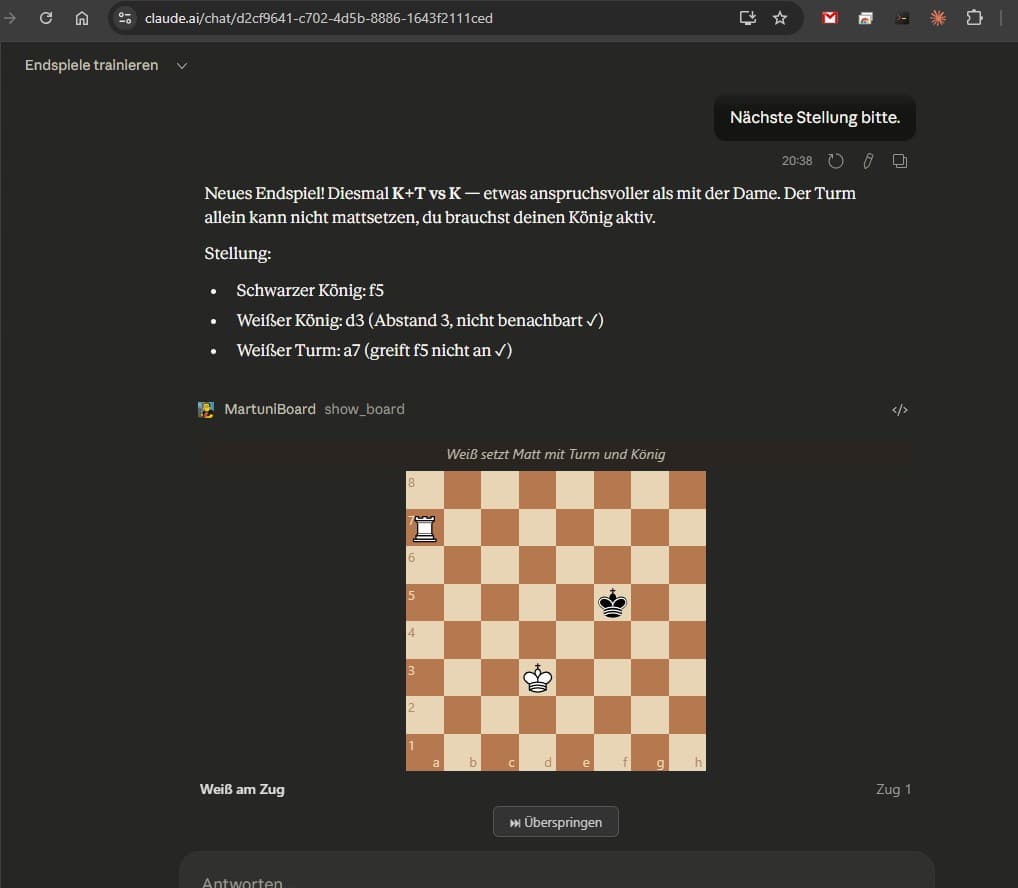 The endgame trainer in claude.ai: coaching text, position description, and interactive board in one conversation. Rook and king versus king — “a bit more challenging than with the queen,” Claude notes.
Looking Ahead
What excites me about MCP Apps isn’t the chessboard. It’s what’s behind it: the idea that the chat interface — this one window we sit in front of all day anyway — becomes a universal tool.
Today, as an individual, I still need to manually enter a URL as a connector and upload a skill as a file. It works, but it’s not elegant. I’m hoping for the day when I can bundle an MCP App — server URL, skills, and tool definitions in one package — and share it with a single click. The way Anthropic already does with their built-in integrations.
But even now, with this manual setup, it works. And it works well enough to show: now is the time to get in. Not next month. Not when it gets more convenient. Now. Because whoever builds on this foundation today will understand tomorrow where the journey leads.
A Personal Note
I’ve been programming for 26 years. I’ve seen many things come and go — frameworks, paradigms, platforms. But I’ve never had as much joy programming as in the past few weeks.
That’s because of Claude Code. Not because it does the work for me — but because it lifts my creativity to a level I couldn’t reach alone. The idea for the chessboard was mine. But the implementation — ten MCP tools, Stockfish integration, React in an iframe, session management, validation, dark mode, tap-to-move — that would have been a project spanning weeks. Instead, it was a side project spread across a few evenings and a weekend, with two days lost to the flu in between. With a partner who never gets tired and thinks just as sharply at midnight as at eight in the morning.
The git history of this project has 18 commits. Every single one carries the line Co-Authored-By: Claude. That’s not a platitude. It’s the truth. We built this project together — Claude and I.
Try the Martuniboard: mcp.martuni.de/martuniboard/mcp
Endgame Trainer Skill: Download SKILL.md
The Code: The project is part of Schachmentor and is actively being developed.